

Table of contents
It is Thursday afternoon, the tender closes on Monday, and the plan set has just arrived as a 40-page PDF. If you estimate with PlanSwift software, you already know what comes next. You set the scale on every sheet and trace each wall and slab. Then you count every fitting, move the numbers into a spreadsheet and hope nothing slips. PlanSwift does that job well, and plenty of estimators rely on it. Even so, estimating is shifting. Teams now have more laptops, more remote reviewers and more AI doing the first pass on drawings. This guide compares five PlanSwift alternatives, from tools popular in Australia to tools built around AI takeoff. By the end, you can decide whether to stay or switch.
A note before we start: IntoAEC publishes this blog, and IntoAEC is one of the five tools below. This is our own comparison, not an independent review, and we have not run hands-on benchmarks of every product. We built it from each vendor’s public pages and from published user reviews, checked on 12 October 2026. The numbering is for readability only and is not a ranking.
What does PlanSwift software do well, and why do teams look elsewhere?
PlanSwift is on-screen takeoff and estimating software for Windows, now owned by ConstructConnect. You open a plan, set the scale, measure lengths, areas and counts, and turn those quantities into an estimate. PlanSwift’s own material highlights custom reports, assemblies and templates, and the product has a long track record with trade contractors.
It has also moved into AI. In May 2026 PlanSwift added Takeoff Boost, a set of AI tools covering Auto Takeoff, Auto Scale, Auto Count and Auto Bookmark. That changes the comparison. Having AI is no longer what separates one tool from another. What separates them is where the AI sits, which platform you work on, and how far the software reaches beyond the takeoff itself.
So why do teams look around? The reasons that come up in published reviews and vendor comparisons are mostly practical. PlanSwift’s system requirements are written for Windows, so Mac users need a workaround. Its Excel functions need a local copy of Microsoft Excel. One Capterra reviewer lists the desktop-based setup as a drawback. Cost is another trigger. Third-party review sites currently list PlanSwift Professional at around US$2,000 per year, so weigh that in Australian dollars before a renewal. None of this makes PlanSwift a poor choice. It simply means your workflow should decide.
How did we choose these five PlanSwift alternatives?
We chose each tool by the same five tests: documented takeoff capability, platform, AI approach, Australian relevance and pricing transparency.
Each tool had to meet the same tests before it made the list:
- Documented takeoff capability. The vendor publishes what the software does, so you can check it.
- Platform. We noted whether it runs on the web, on desktop, or both.
- AI approach. We recorded what the vendor says is automated, and left out anything we could not source.
- Australian relevance. The tool is built in Australia, or is listed as available to Australian buyers.
- Pricing transparency. Where sources disagreed on a price, we left the number out or gave a range and told you to confirm it.
Other tools also deserve a look using the same checklist, including Bluebeam, Kreo, Beam AI, CostX and On-Screen Takeoff. We did not shortlist them here because we wanted five products we could document properly.
What do the five PlanSwift alternatives look like at a glance?
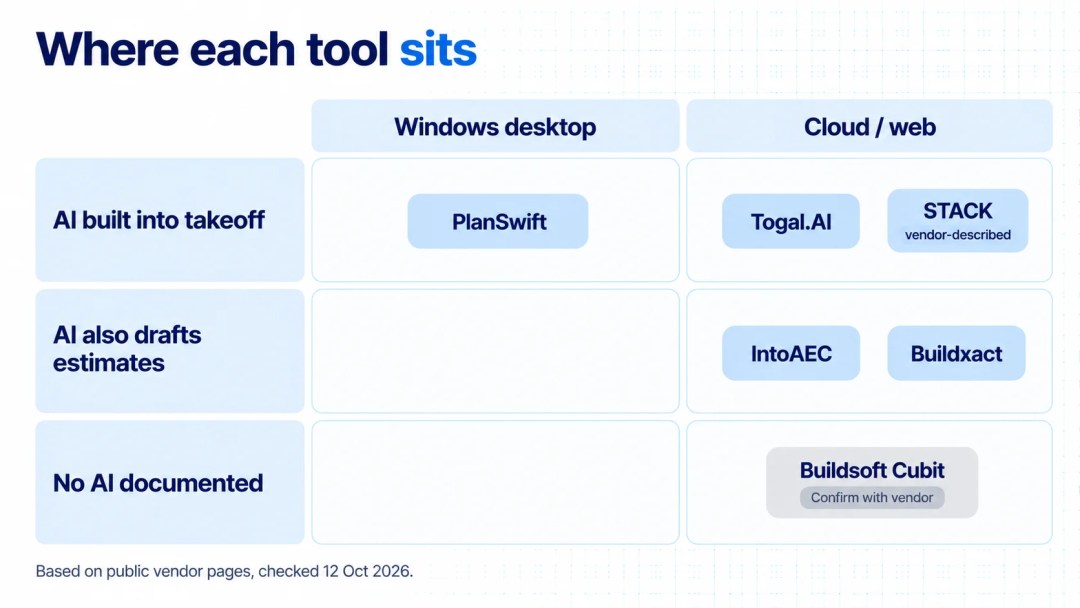
The five alternatives differ most on platform, on where the AI sits, and on how pricing is set.
| Tool | Best for | Platform | AI approach | Pricing model |
|---|---|---|---|---|
| PlanSwift (reference) | On-screen takeoff for Windows users | Windows desktop | Takeoff Boost (May 2026) | Listed at around US$2,000 per year on review sites; free trial |
| IntoAEC | Takeoff, estimates and delivery in one platform | Web, iOS, Android | Zyra AI in takeoff, estimates and proposals | Per user, on request; free trial |
| Buildxact | Australian residential builders and renovators | Cloud | Blu AI assistants | Tiered monthly plans; 14-day free trial |
| Togal.AI | AI-first automated takeoff | Cloud (web) | AI detection and measurement | Per user; listed from about US$250 to US$300 per month |
| STACK | Cloud takeoff on Mac and PC | Cloud | AI-accelerated features | Free version plus paid plans |
| Buildsoft Cubit | Australian estimators wanting takeoff straight into estimates | Confirm with vendor | None documented in sources checked | Enquire with vendor |
Which five PlanSwift alternatives are worth a closer look?
Each of the five covers a different need: Australian residential building, AI-first takeoff, cloud estimating for Mac and PC, locally familiar software, and an all-in-one platform.
1. IntoAEC: best for takeoff, estimates and delivery in one platform
Who is IntoAEC best for? Contractors, design-build firms and AEC practices that move quantities from a takeoff tool into Excel. From there, the numbers travel to a proposal tool, then to scheduling and invoicing.
Why it made this list. IntoAEC’s 2D Takeoff sits in the same platform as estimates, BoQs, proposals, scheduling, procurement and invoicing. For a team that is tired of juggling five or six disconnected tools, that matters more than any single takeoff feature.
Key features
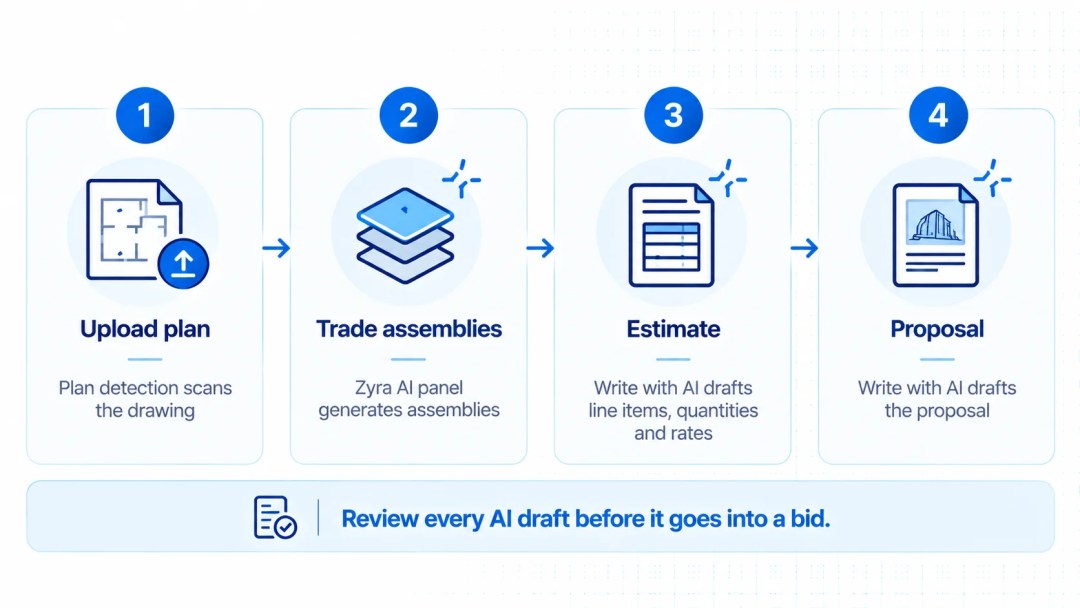
- 2D takeoff from PDF plans, with plan detection that scans a drawing when you upload it
- A Zyra AI panel in takeoff that generates trade assemblies
- Write with AI in Estimates: describe the job in plain language and Zyra drafts line items, materials, quantities and rates, with budget alternatives and rate analysis
- Write with AI in Proposals
- Scheduling, procurement and invoicing in the same workspace, on web, iOS and Android
Pros and cons
- Pro: takeoff, estimate and proposal live in one place, and AI helps at several stages of pre-construction
- Pro: browser and mobile access, so you are not tied to one Windows machine
- Con: newer to market than PlanSwift, with a public launch in late 2025
- Con: takeoff is built around 2D plans
- Con: pricing is per user and given on request rather than published
- Con: if you only want a standalone takeoff seat, a broader platform may be more than you need
As with any AI output, an estimator should review what Zyra generates before it goes into a bid.
2. Buildxact: best for Australian residential builders and renovators
Who is Buildxact best for? Buildxact positions itself for small to medium residential builders, renovators and contractors.
Why it made this list. Buildxact was founded in Australia in 2011 and now has customers in Australia, New Zealand, the UK, the US and Canada. Its Blu AI assistant covers a Takeoff Assistant that scales uploaded plans automatically, an Estimate Generator, an Estimate Reviewer and a Recipe/Assembly Assistant.
Key features
- Takeoff and estimating, with a plan tier listed as estimating and takeoff only
- Supplier pricing connections for current material costs
- Integrations with accounting tools including Xero and QuickBooks
- Digital signatures, timesheets and scheduling
- A 14-day free trial
Pros and cons
- Pro: Australian origin and local market focus
- Pro: AI assistants built into the estimating workflow
- Con: residential focus, so commercial or multi-trade estimators should check the fit
- Con: confirm which Blu tools come with each plan before you buy
3. Togal.AI: best for AI-first automated takeoff
Who is Togal.AI best for? General contractors, specialty trades and estimating teams whose biggest bottleneck is reading plans.
Why it made this list. Togal.AI is built around automated takeoff. Its AI detects and measures elements on a plan set, and it supports common drawing formats including PDF, JPEG, PNG and TIFF. It also offers Togal.CHAT, which lets you ask questions of your project documents, and AI-driven image and symbol search.
Key features
- Automated takeoff from plan sets
- Cloud-based web application
- Collaboration with colleagues and with people outside your account
- Pricing listed per user, at roughly US$250 to US$300 per month depending on the page and the billing term, so confirm before you budget
Pros and cons
- Pro: speed on the first pass, especially on floor plans
- Pro: cloud access without a local install
- Con: it focuses on takeoff and pre-construction rather than a full estimating and delivery suite
- Con: automated results depend on plan quality and still need an estimator’s review
- Con: pricing is in US dollars
4. STACK: best for cloud takeoff on Mac and PC
Who is STACK best for? Contractors across several trades who want cloud-based takeoff and estimating that works on both Mac and PC.
Why it made this list. STACK runs in the cloud on a floating licence, so users can sign in from different machines. Capterra lists it as available in Australia, with a free version and a free trial. STACK describes its software as AI-accelerated.
Key features
- Digital plan measurement, assemblies and customisable estimate reports
- An integrated cost database, with the option to import your own pricing
- Takeoff and estimating in a single cloud workspace
Pros and cons
- Pro: works on Mac and PC, with a free way to start
- Pro: large pool of published user reviews to read before you commit
- Con: it is primarily a takeoff and estimating product
- Con: some Capterra reviewers have raised pricing flexibility and support hours for the Australian time zone, so ask about both
5. Buildsoft Cubit: best for Australian estimators who want takeoff straight into estimates
Who is Cubit best for? Estimators in Australia and New Zealand who want measuring and pricing in one familiar tool.
Why it made this list. Cubit by Buildsoft is described as a popular estimating tool in Australia and New Zealand, known for on-screen takeoff from digital plans. Its Capterra listing says it takes off quantities from plans directly into the estimate and lists availability in Australia and the US.
Key features
- On-screen takeoff from digital plans
- Assembly takeoff and estimating in one product
Pros and cons
- Pro: local familiarity and a combined takeoff-to-estimate workflow
- Con: we found no AI takeoff features documented in the sources we checked, so ask Buildsoft what is available today
- Con: confirm how it is deployed, and what it costs, directly with the vendor
How do AI-powered takeoff features compare across these tools?
AI takeoff means different things in different tools: some automate the measuring, some draft the estimate, and some answer questions about your documents.
Every vendor now uses the word AI, but they do not mean the same thing. Some use it for the takeoff itself. Others use it to draft estimates or answer questions about your documents. This table shows what each vendor says it automates, based on its public pages.
| Tool | AI in takeoff | AI beyond takeoff |
|---|---|---|
| PlanSwift | Takeoff Boost: Auto Takeoff, Auto Scale, Auto Count, Auto Bookmark | Not covered in the sources we checked |
| IntoAEC | Plan detection on upload; Zyra AI panel generates trade assemblies | Write with AI in estimates and proposals |
| Buildxact | Blu Takeoff Assistant scales uploaded plans | Estimate Generator, Estimate Reviewer, Recipe/Assembly Assistant |
| Togal.AI | AI detection and measurement of plan elements | Togal.CHAT for project documents; AI image and symbol search |
| STACK | Described by the vendor as AI-accelerated; ask for a demo of the exact tools | Not detailed in the sources we checked |
| Buildsoft Cubit | None documented in the sources we checked | None documented in the sources we checked |
Treat any time-saving figure a vendor quotes as a vendor claim. We have not repeated them here, because the only fair test is your own drawings.
Which PlanSwift alternative fits your team?
The right alternative depends on your main constraint, whether that is platform, market, AI or how much of the job you want in one place.
Start with the problem you actually have, then match it to a tool:
- You like PlanSwift’s workflow but want AI help. Check PlanSwift’s own Takeoff Boost first, because staying put may be the cheapest fix.
- You build or renovate homes in Australia. Buildxact was designed for that market.
- Plan reading is your bottleneck. Togal.AI is built around automated takeoff.
- Your team uses a mix of Mac and PC. STACK and the browser-based tools remove the Windows dependency.
- You want takeoff, estimates and delivery in one platform. IntoAEC is built for that scope.
- You want locally familiar software. Cubit is worth a demo.
Whichever you shortlist, put the same questions to every vendor. Does it price in Australian dollars and handle GST? Can it work in metric units? Are support hours in your time zone? Can it pull supplier pricing you actually buy from? Can it export in the formats your office uses?
One more check matters for contract work. Suppose you price work under AS 4000 or AS 4902 contracts. Your estimate then becomes the baseline you defend when variations and payment claims arrive under your state’s Security of Payment legislation. Ask how each tool keeps your estimate traceable once the job starts. This is a process question rather than legal advice, so speak to your adviser about your own contracts.

How do you switch from PlanSwift without risking a live tender?
Switch by running a closed job through the new tool first, and retire your old workflow only after the numbers match.
- Pick a closed job. Use a project you have already priced, so you know the right answer.
- Run the same plans through the new tool. Compare quantities line by line against your PlanSwift takeoff.
- Rebuild your top assemblies first. Your ten most-used assemblies will cover most of your day-to-day work.
- Check scale and units on every sheet. A wrong scale is the most common way a fast takeoff becomes an expensive mistake.
- Run both tools side by side on one live tender. Only retire the old workflow once the numbers match.
Make the switch decision on your own drawings
The best PlanSwift alternative is the one that handles your last three tenders without surprises. Shortlist two or three tools from this list and run a closed job through each. Then compare quantities, speed and how easily the estimate becomes a proposal. Want to see how IntoAEC handles takeoff, estimates and proposals in one workspace? Book a demo and bring a plan set of your own.
Frequently asked questions
It depends on your workflow. Buildxact suits Australian residential builders. Togal.AI suits teams that want AI-first takeoff, and STACK suits mixed Mac and PC teams. Cubit suits estimators who want locally familiar software. IntoAEC suits firms that want takeoff, estimates and delivery in one platform. Test two or three on a closed job before you decide.
Yes. PlanSwift’s system requirements are written for Windows. STACK is listed as working on Mac and PC. The cloud-based tools in this guide, including IntoAEC, Buildxact and Togal.AI, run in a browser, so they do not depend on your operating system.
Yes. PlanSwift added Takeoff Boost in May 2026, which includes Auto Takeoff, Auto Scale, Auto Count and Auto Bookmark. The real question is whether those features, and the Windows desktop setup around them, fit how your team works.
Several third-party review sites currently list PlanSwift Professional at around US$2,000 per year. Always confirm the current price and licence terms on PlanSwift’s own pricing page, because sources disagree and prices change.
Buildxact was founded in Australia, and Cubit by Buildsoft is popular in Australia and New Zealand. STACK and Togal.AI are both listed as available to Australian buyers, and IntoAEC is web-based, so Australian teams can use it from any browser.
Related articles


Product information in this article was compiled from public vendor pages and published reviews on 12 October 2026. Features and prices change, so confirm details with each vendor. All product names are trademarks of their respective owners, and IntoAEC is not affiliated with any of the other companies named.