

Table of contents
Picture a builder in Brisbane closing out a run of townhouses. The team priced the job carefully, the client was happy at handover, and paid every progress claim on time. Two months later, the accountant reconciles the final numbers. The margin that looked healthy on the estimate has mostly gone. Nobody can point to the week it started slipping.
That gap between spending the money and seeing it is the real problem that construction job costing solves. This guide explains why losses surface so late and how job costing works line by line. It also covers the costs that leak most on Australian projects. Finally, it shows how budget-vs-actual tracking with deviation alerts warns you while there is still time to act.
What is construction job costing, and why does it matter for Australian builders?
Construction job costing means recording every cost against its job and cost code, then comparing it with that line’s budget while the job is still running.
Your accounting file tells you how the business is doing overall. Job costing tells you how each project is doing, trade by trade and stage by stage. A profitable quarter can hide one job that is quietly losing money. That is usually the job you will price the same way next time.
This matters in Australia because builders let so much work on fixed-price terms, including lump sum contracts under AS 4000. Once both parties agree the contract sum, every overrun comes out of your margin. The only exception is a cost you capture and price as a variation. Job costing tells you whether the job is still earning what you priced, before the next progress claim goes out.
Why do contractors only find out they lost money after the job is finished?
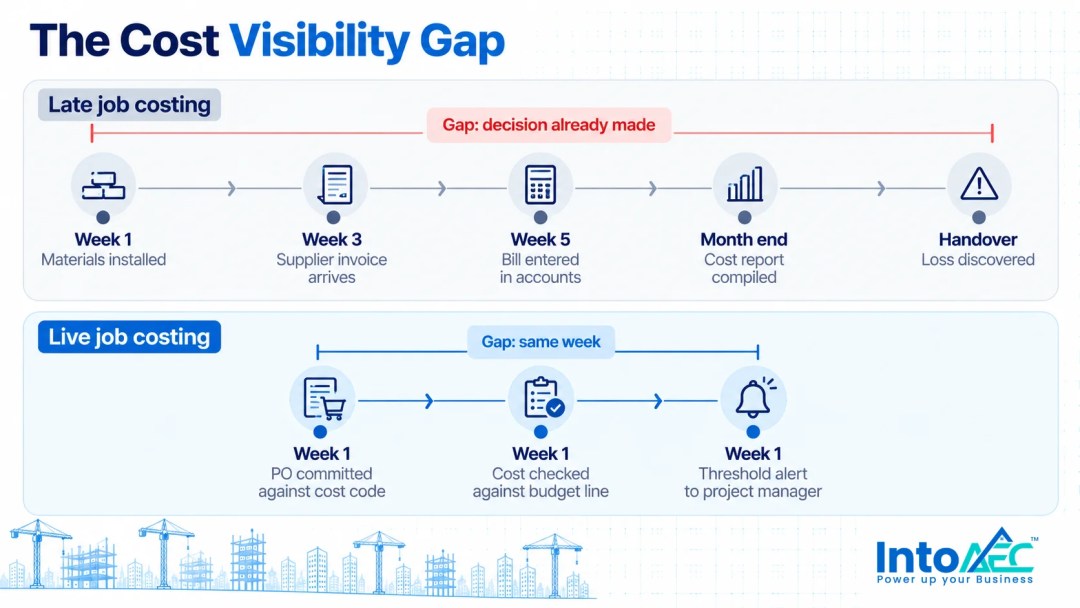
Most builders discover losses late because their cost data arrives late. Invoices land weeks after crews use the materials, and variations sit unpriced until the final account.
None of this is a skills problem. Site supervisors and QS teams know the work. The issue is that the numbers pass through too many hands and tools before anyone checks them against the budget. Four patterns show up on almost every job.
The invoice lag
The crew delivers and installs materials on Monday, but the supplier invoice might not land until the following month. Until then, the job looks cheaper than it really is. By the time the bill lands, the frame is up and the decision that caused the overspend is long gone.
Labour hours that never reach the job
Labour is often the hardest cost to see. Crews sometimes log hours against the wrong job, and travel between sites goes unrecorded. Overtime only shows up when payroll runs. If your system does not tie timesheets to the job and cost code, labour overruns stay invisible until the end.
Variations agreed on site but never priced
A client asks for an extra window or a new kitchen layout. The supervisor agrees on the spot, and the crew gets on with it. If nobody writes up, prices and approves that change, you absorb the cost. Unpriced variations are one of the most common reasons a fixed-price job finishes thin.
Spreadsheets that are only right on the day they are updated
A cost tracking spreadsheet is accurate on the afternoon someone updates it. After that, it starts drifting. When one person has to pull figures from the accounting file, supplier emails and site notes, updates happen before meetings. Problems rarely wait for meetings. Our guide to construction budget management in Australia covers the wider budgeting side of this in more depth.
How does construction job costing work, step by step?
Job costing sets a budget per cost code from the estimate and records committed and actual costs against each code. A forecast to complete then keeps the projected margin current.
- Build the budget from the estimate. Break the estimate into cost codes that match how you build, such as slab, framing, roofing, plumbing and electrical. The budget is only as good as the estimate behind it, so this is where accuracy pays off first. If you price from a bill of quantities, our explainer on what a BOQ is and how it feeds cost estimation covers the groundwork.
- Lock the baseline and keep variations separate. Once both parties sign the contract, freeze the original budget. Approved variations get their own lines, so you can always see the original job and the changes side by side.
- Record committed costs when you commit them. A purchase order or subcontract is money you have promised, even if the invoice has not arrived. Counting it at the point of commitment removes most of the invoice lag.
- Capture actual costs against the right code. Labour comes from timesheets, materials from supplier bills, and subcontractor costs from their claims. Each one needs a job and a cost code attached at entry, not at month end.
- Forecast the cost to complete. For each line, estimate what you still need to spend. Spent to date plus forecast to complete gives the projected final cost. That number tells you where the margin will land.
- Review weekly and act on the variances. Find the lines where the projected final cost is moving away from budget. Then decide what to do while the trade is still on site.
A worked example: mid-job cost review
Here is a simple example of what that review might show halfway through a job. The figures are illustrative only.
| Cost code | Budget | Spent to date | Forecast to complete | Projected final | Variance |
|---|---|---|---|---|---|
| Framing labour | A$48,000 | A$31,500 | A$22,000 | A$53,500 | -A$5,500 |
| Timber and hardware | A$36,000 | A$24,200 | A$10,300 | A$34,500 | +A$1,500 |
| Plumbing (subcontract) | A$42,000 | A$18,000 | A$24,000 | A$42,000 | A$0 |
| Approved variation V03 | A$6,500 | A$2,100 | A$4,400 | A$6,500 | A$0 |
| Total | A$132,500 | A$75,800 | A$60,700 | A$136,500 | -A$4,000 |
On these numbers the job is heading A$4,000 over. Almost all of it sits in framing labour. That is a conversation to have with the framing crew in week five, not a surprise in the final account.
What is the difference between job costing and a budget-vs-actual report?
A budget-vs-actual report compares planned spend with actual spend. Job costing adds committed costs and a forecast to complete, which turns that report into an early warning.
A simple budget-vs-actual view can look fine on a line where spending has only reached half the budget. Yet the work on that line may have barely started. Adding committed costs and a forecast to complete is what reveals that the line is heading over. Both views are useful, but only the second one tells you how the job is likely to finish.
Which costs slip through job costing most often on Australian projects?
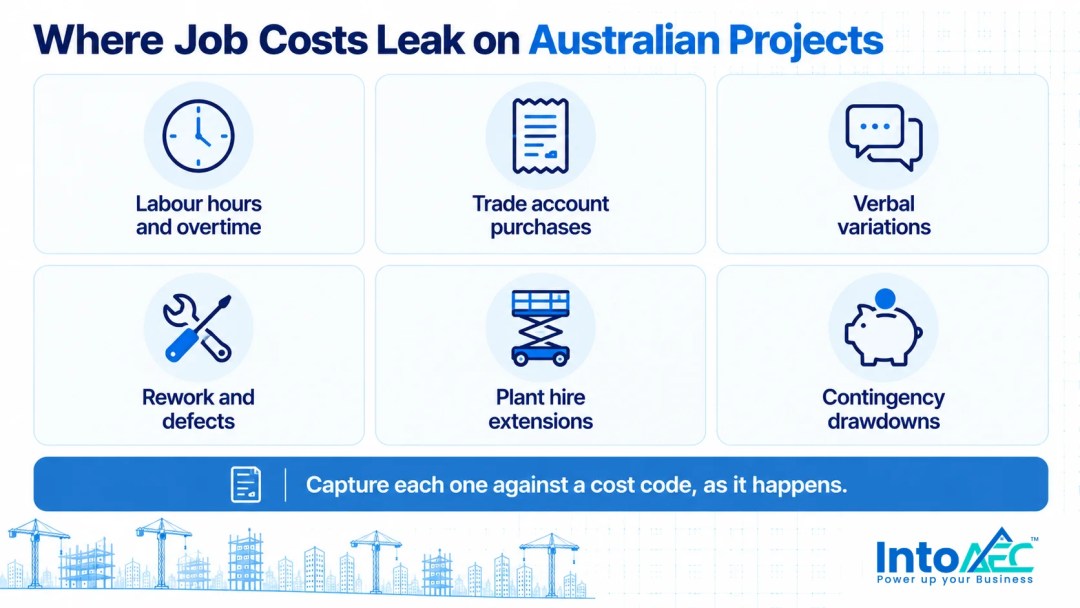
The costs that slip through most often are the small, frequent or informal ones that never pass through a formal approval.
- Labour hours and overtime. Hours logged late or against the wrong job distort every labour line. Labour also tends to have the least room for error.
- Trade account purchases. Small top-up orders at the local supplier add up quickly, and they rarely go through a purchase order.
- Verbal variations. Changes agreed on site without a written, priced and approved variation become your cost by default.
- Rework and defects. Fixing work that was not right the first time is a real cost. However, it often disappears into the original trade line.
- Plant and equipment hire extensions. A scissor lift kept for an extra fortnight because the programme slipped rarely shows up against the job.
- Contingency drawdowns. If nobody records why contingency money leaves the job, it disappears early, leaving nothing for the risks it should cover.
How do budget-vs-actual tracking and deviation alerts catch losses earlier?
They catch losses earlier by checking each new cost against its budget line as you record it. When a line crosses a threshold you have set, the system flags the job straight away.
The value is in timing. In a connected system, the system records each bill or expense against a cost code as it comes in, then compares the running total with the budget for that line. If framing labour reaches a level you have defined as a warning, the project manager hears about it that week.
The thresholds are yours to set, and they should reflect how you run jobs. Some builders want a flag when any line passes a percentage of its budget. Others care about the whole job crossing a margin floor. Either way, the alert prompts a decision. You might talk to the trade, raise a variation or adjust the forecast. It does not make the decision for you.
This is also where Security of Payment legislation becomes relevant. Every Australian state and territory has its own Security of Payment Act. Each gives contractors a statutory right to make progress claims, but the rules and timeframes differ. DLA Piper’s overview of security of payment in Australia sets out the statutes by state. Current job cost data helps you support each claim with accurate figures. It also shows when money coming in is falling behind money going out. For anything specific to your contract or state, talk to your lawyer.
Where does AI actually help with job costing?
AI helps most at the start of the job, by producing a more complete estimate that becomes the budget baseline. Tracking against that baseline still depends on disciplined cost capture.
A large share of late surprises start in the estimate. A missed item, an outdated rate or a vague allowance becomes a budget line that was never realistic. In IntoAEC, Zyra AI powers the Write with AI feature in Estimates. It generates line items, materials, quantities and rates from a plain-language description of the work. It can also suggest budget alternatives and rate analysis. Your estimator still reviews and adjusts every line before it goes to the client.
You don’t interact with the AI. You just stop doing the work it handles. Once approved, the estimate becomes the structure of your budget. As a result, the cost codes you track on site match the way you priced the job.
The tracking itself is deliberately rules-based. Alerts fire on thresholds you control, and costs land against budget lines because you recorded them that way. That predictability is what you want from the numbers that decide whether a job is on track.
How does IntoAEC connect the estimate, the budget and the actual costs?
IntoAEC keeps the estimate, budget, purchasing, labour and variations in one project record. Bills and expenses flow straight into the budget, so nobody re-keys them from another system.
- Project Budgeting. The platform tracks planned, approved and actual budgets across project phases, with budgets linked to estimates, proposals, bills and expenses. Creator, approver and manager roles control who can change what, and it tracks contingency as its own allocation.
- Alerting System. Rules-based alerts notify the right people when a cost meets the conditions you set, so a problem reaches them while the trade is still on site.
- Change Orders for variations. The platform captures scope changes, applies them to the estimate and sends them to the client for signed approval. Your team prices variations before the cost hits the job.
- Purchasing and timesheets. Purchase orders give you a record of what you have committed before the invoice arrives, and timesheets capture labour hours by project.
- Accounting integration. IntoAEC connects with Xero and QuickBooks, so your accounting file and your project costs are working from the same figures.
The point is a single version of each job. When the estimate, budget and actual costs live together, the weekly cost review gets much faster. Nobody spends an afternoon chasing figures. Working across Queensland, NSW or Victoria? The IntoAEC Australia page shows how the platform fits Australian builders and QS teams.
Stop finding out at handover
Job costing only protects your margin if the numbers are current. Start with a realistic baseline from the estimate, and record costs against the right line as they happen. Then forecast what you still have to spend, and get a prompt when a line starts drifting. Do that, and the losses that used to appear in the final account show up in the week they start.
Want to see it on an Australian project? Book a demo of IntoAEC, and we will walk you through the estimate, budget and actuals workflow on a sample job.

Frequently asked questions
Construction job costing is the process of tracking every project cost against the budget for that specific job while work is still under way. That includes labour, materials, subcontractors, plant and variations. It shows how each job is performing trade by trade, rather than only how the business is doing overall.
At least weekly, with labour captured as close to daily as your timesheet process allows. Weekly reviews are frequent enough to act on a drifting line while the trade is still on site. Monthly reviews tend to show problems only after you have already finished the work that caused them.
Cost codes are the categories you track costs against. They usually match trades or stages such as slab, framing or roofing. Using the same codes in the estimate, budget and purchasing makes every cost easy to compare.
Accounting software records costs well. However, it usually sees them only once someone enters a bill or payroll run, often weeks after you incurred the cost. Many builders pair their accounting file with a construction platform that tracks committed costs, forecasts and variations per job. IntoAEC integrates with Xero and QuickBooks for that reason.
Every Australian state and territory has Security of Payment legislation giving contractors a statutory right to make progress claims. The rules vary by jurisdiction. Accurate, current job costs make it easier to support each claim and to see when payments are falling behind costs. For advice on your specific contract or state, speak to a construction lawyer.


